vsftp Nice and Secure with KompoZer
Back on the Prototype / Web Dev Scene
Ive been doing some Prototype work lately. Keeping true to the FOSS tradition I am using, not Dreamweaver as a Web Design IDE, but KompoZer which I find to be the closest thing from a visual layout perspective.
Kompozer – the FOSS Web Design IDE
Although I prefer publishing files remotely from a Web Design tool via SFTP, KompoZer only supports FTP. That being said it does support SSL enabled FTP. I am very lucky to know some excellent Sys Admins.
FTP – Secure?
The consensus seems to be that vsftp is pretty darn secure if set up right. One amazing Sys Admin, Kevin Korb, uses a home grown ftp server born and bred @ FutureQuest by Bruce Guenter which he says can’t be beat. Its called twoftp and you can get here: http://untroubled.org/software.php.
vsftp setup on CentOS 5
Here’s how I got vsftp nice and secure with KompoZer publishing to my server. Please note my server distro is CentOS 5 32bit kernel v. 2.6.18-92.el5.
Creating a user
I created a user with:
- a primary group of apache (httpd group)
- a second group ftp
- starting shell /bin/bash
- password of xxxx
- home directory of /var/www/html – where my website files reside on the server
- a login name of jewelsjacobs
# useradd -gapache -Gftp -s/bin/shell -pxxxx -d/var/www/html jewelsjacobs
Installing vsftp
I installed vsftp server via yum:
# yum vsftpd
Configuring vsftp
I modified the /etc/vsftpd/vsftpd.conf
# vi /etc/vsftpd/vsftpd.conf
This is what mine looks like:
# Example config file /etc/vsftpd/vsftpd.conf

#

# The default compiled in settings are fairly paranoid. This sample file

# loosens things up a bit, to make the ftp daemon more usable.

# Please see vsftpd.conf.5 for all compiled in defaults.

#

# READ THIS: This example file is NOT an exhaustive list of vsftpd options.

# Please read the vsftpd.conf.5 manual page to get a full idea of vsftpd's

# capabilities.

background=YES

#

# Allow anonymous FTP? (Beware - allowed by default if you comment this out).

anonymous_enable=NO

#

# Uncomment this to allow local users to log in.

local_enable=YES

#

# Uncomment this to enable any form of FTP write command.

write_enable=YES

#

# Default umask for local users is 077. You may wish to change this to 022,

# if your users expect that (022 is used by most other ftpd's)

local_umask=022

#

# Uncomment this to allow the anonymous FTP user to upload files. This only

# has an effect if the above global write enable is activated. Also, you will

# obviously need to create a directory writable by the FTP user.

#anon_upload_enable=YES

#

# Uncomment this if you want the anonymous FTP user to be able to create

# new directories.

#anon_mkdir_write_enable=YES

#

# Activate directory messages - messages given to remote users when they

# go into a certain directory.

dirmessage_enable=YES

#

# The target log file can be vsftpd_log_file or xferlog_file.

# This depends on setting xferlog_std_format parameter

xferlog_enable=YES

#

# Make sure PORT transfer connections originate from port 20 (ftp-data).

connect_from_port_20=YES

#

# If you want, you can arrange for uploaded anonymous files to be owned by

# a different user. Note! Using "root" for uploaded files is not

# recommended!

#chown_uploads=YES

#chown_username=whoever

#

# The name of log file when xferlog_enable=YES and xferlog_std_format=YES

# WARNING - changing this filename affects /etc/logrotate.d/vsftpd.log

#xferlog_file=/var/log/xferlog

#

# Switches between logging into vsftpd_log_file and xferlog_file files.

# NO writes to vsftpd_log_file, YES to xferlog_file

xferlog_std_format=YES

#

# You may change the default value for timing out an idle session.

idle_session_timeout=600

#

# You may change the default value for timing out a data connection.

data_connection_timeout=120

#

# It is recommended that you define on your system a unique user which the

# ftp server can use as a totally isolated and unprivileged user.

#nopriv_user=ftpsecure

#

# Enable this and the server will recognise asynchronous ABOR requests. Not

# recommended for security (the code is non-trivial). Not enabling it,

# however, may confuse older FTP clients.

#async_abor_enable=YES

#

# By default the server will pretend to allow ASCII mode but in fact ignore

# the request. Turn on the below options to have the server actually do ASCII

# mangling on files when in ASCII mode.

# Beware that on some FTP servers, ASCII support allows a denial of service

# attack (DoS) via the command "SIZE /big/file" in ASCII mode. vsftpd

# predicted this attack and has always been safe, reporting the size of the

# raw file.

# ASCII mangling is a horrible feature of the protocol.

#ascii_upload_enable=YES

#ascii_download_enable=YES

#

# You may fully customise the login banner string:

ftpd_banner=Welcome to blah FTP service.

#

# You may specify a file of disallowed anonymous e-mail addresses. Apparently

# useful for combatting certain DoS attacks.

#deny_email_enable=YES

# (default follows)

#banned_email_file=/etc/vsftpd/banned_emails

#

# You may specify an explicit list of local users to chroot() to their home

# directory. If chroot_local_user is YES, then this list becomes a list of

# users to NOT chroot().

#chroot_list_enable=YES

# (default follows)

chroot_list_file=/etc/vsftpd/chroot_list

#

# You may activate the "-R" option to the builtin ls. This is disabled by

# default to avoid remote users being able to cause excessive I/O on large

# sites. However, some broken FTP clients such as "ncftp" and "mirror" assume

# the presence of the "-R" option, so there is a strong case for enabling it.

#ls_recurse_enable=YES

#

# When "listen" directive is enabled, vsftpd runs in standalone mode and

# listens on IPv4 sockets. This directive cannot be used in conjunction

# with the listen_ipv6 directive.

listen=YES

#

# This directive enables listening on IPv6 sockets. To listen on IPv4 and IPv6

# sockets, you must run two copies of vsftpd whith two configuration files.

# Make sure, that one of the listen options is commented !!

#listen_ipv6=YES
pam_service_name=vsftpd

userlist_enable=YES

tcp_wrappers=YES

ftp_username=ftp

max_per_ip=4

force_dot_files=NO

listen_address=21

#hide_file=

#anon_max_rate=

#local_max_rate=

chroot_local_user=NO

anon_upload_enable=NO

anon_mkdir_write_enable=NO

anon_other_write_enable=NO
# Enable SSL

ssl_enable=YES

allow_anon_ssl=NO

force_local_data_ssl=NO

force_local_logins_ssl=YES
ssl_tlsv1=YES
ssl_sslv2=NO
ssl_sslv3=NO
rsa_cert_file=/etc/pki/tls/certs/vsftpd.pem
Create the secure certificate
# cd /etc/pki/tls/certs
# make vsftpd.pem
FTP settings for KompoZer
Here are my settings in KompoZer:

IRC for Dummies using Pidgin
I’m ashamed to admit I’ve been avoiding IRC for a while. I recently joined a local Linux user group whose very cool members all communicate through IRC.
I was surprised how easy it was to set up in Pidgin, the Linux IM app I’m using. I thought I’d share the joy.
Here’s how to make it happen.
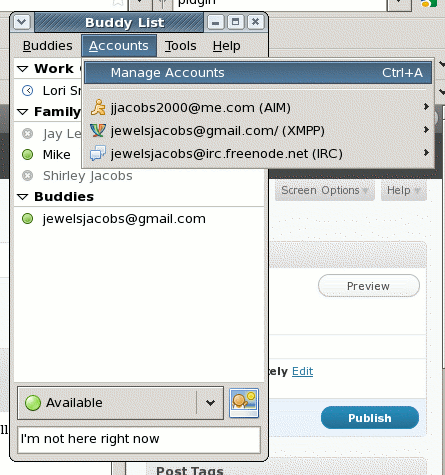
Once Pidgin is installed and good to go, add an IRC account by clicking Accounts > Manage Accounts.
In the Accounts window click the Add button.
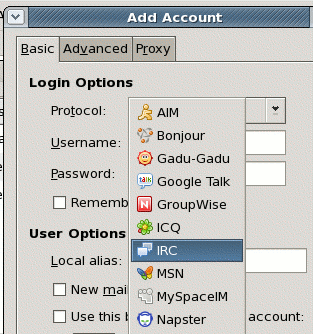
Choose the IRC Protocol
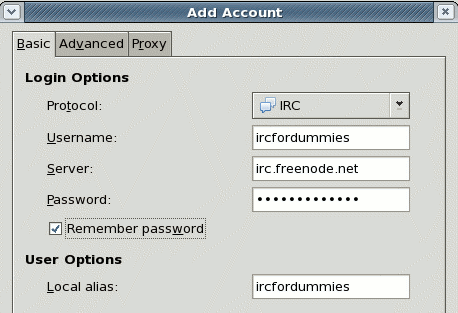
In the Basic Tab, choose a new Username and Password. Your password cannot be the same as your username. You will register it in a minute. Keep Server irc.freenode.net.
Click the +Add and Close out of both windows.
You will see a an irc chat window that looks like this (ignore the other tabs):
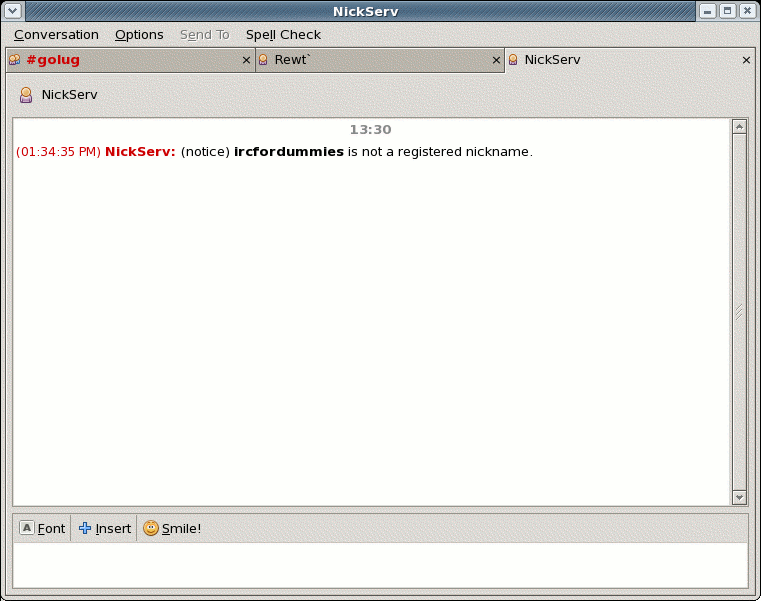
Type REGISTER <your password> <your email address>
You will receive an email with instructions on how to proceed.
Now if you go to Buddies > Join a Chat and pick your IRC account you can click the Room List button to see a list of rooms or type a room name to join that room.
Have fun!
Preparing your Organization for Open Source – Part II – Adventure
Now that the players are on board, it’s time to go ahead. At this point it’s a good idea to toss any heavy baggage, pack lite and keep all eyes and ears open.
Travel light
- Drop Windows, MSSQL, Oracle, etc. Start off with a clean slate.
- Virtualize the Infrastructure.
Stay Open
- Make sure to keep in contact with the Open Source Development community. Get IM account IDs.
- Have a Sandbox environment outside of the internal network which mirrors the development environment. Give developers in the community access to help with issues.
- Contribute by submitting bugs, enhancement requests, documentation, patches, and plugins. Participate in the software’s direction.
Be inspired
Open Source Software grows and changes fast. The good apps get a lot of add ons, enhancements, modules and mash-ups. There are many important ideas out there in the OSS community. What benefits one organization will most likely benefit another. Take the opportunity to let those, and others improve your organization.
Preparing your Organization for Open Source – Part I – Passion
When Prometheus stole fire from Zeus to help the beloved mortals he fashioned out of clay, Zeus punished him by having him bound to a rock while a great eagle ate his liver every day only to have it grow back to be eaten again the next day.
If Prometheus would have taken that raw passion, done better planning in identifying the needs of the stakeholders (there are always more than meets the eye) and infected them with the same passion would the Board, I mean Zeus, repeatedly attempt to kill his enthusiasm for innovative technology?
Leaders need vision. Passion is the fuel that sustains vision. The BIG mistake that I’ve learned when bringing the fire of Open Source applications to an Enterprise Organization is that ALL of the STAKEHOLDERS HAVE NEEDS. Not just C-Level leadership. Not just IT. Not just end users. Not just department sponsors.
For example, here are just a few additional players and things to consider:
Open Source Software is typically supported by an international community, and core developers which tend to form consulting groups. A lot of them can’t accept payment the same way commercial software vendors and consultants can. Accounts Payable has preferred methods of paying vendors. Legal has specific types of contracts and agreements which may need alteration. What training resources are available and how do they prefer to work. Is there supporting documentation or tech writers if not? The list goes on. . .
There is a complicated web – a string of relationships that all need to be prepared for Open Source.
Before a solution can be presented with confidence and certainty all of these factors must be considered. Then and only than will all of the parties involved see how this new way of doing business will not only save money and increase productivity but BRING THE FIRE OF INNOVATION INTO THE RUT THAT CAN BE THE SAME OLD SAME OLD.

 Open Source and the Magic LAMP
leave a comment